Windows Desktop Application

The Most Complete Way to Benchmark Local LLM Performance & Capability

GpuLLM is a free Windows application that lets you comprehensively evaluate local LLMs — measuring both inference speed (tokens/s, latency) and model capability (MMLU, C-Eval accuracy). Everything is 100% offline — chat, benchmark, GPU monitoring, model management — the only thing that touches the internet is downloading models. Find your ideal model-to-hardware match in minutes, not hours. No cloud dependency, no API keys, no data ever leaves your machine.

Windows 10 / 11100% Offline11 LanguagesCUDA / Vulkan / CPU

See It for Yourself

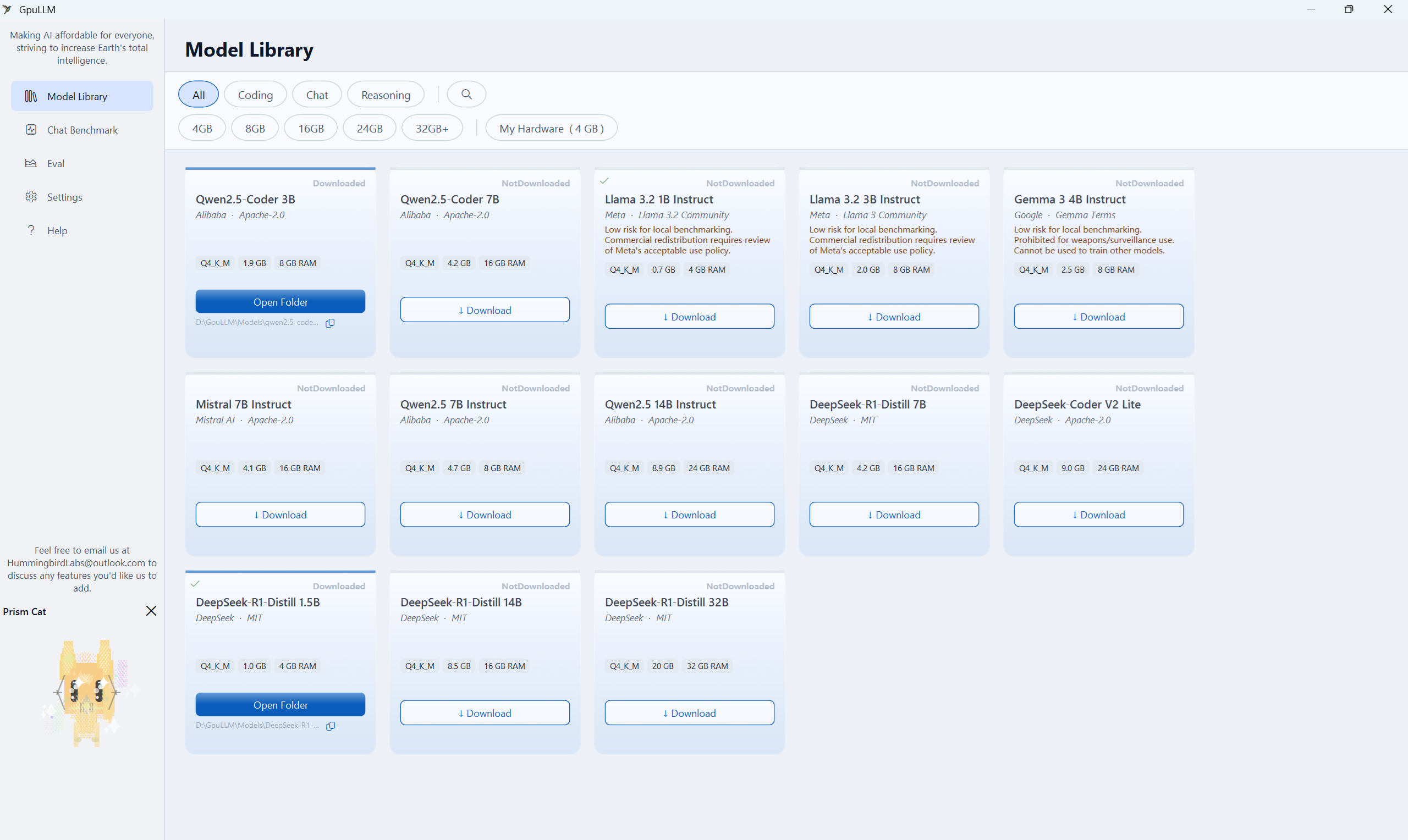
Model Library — Browse, filter and download curated LLM models
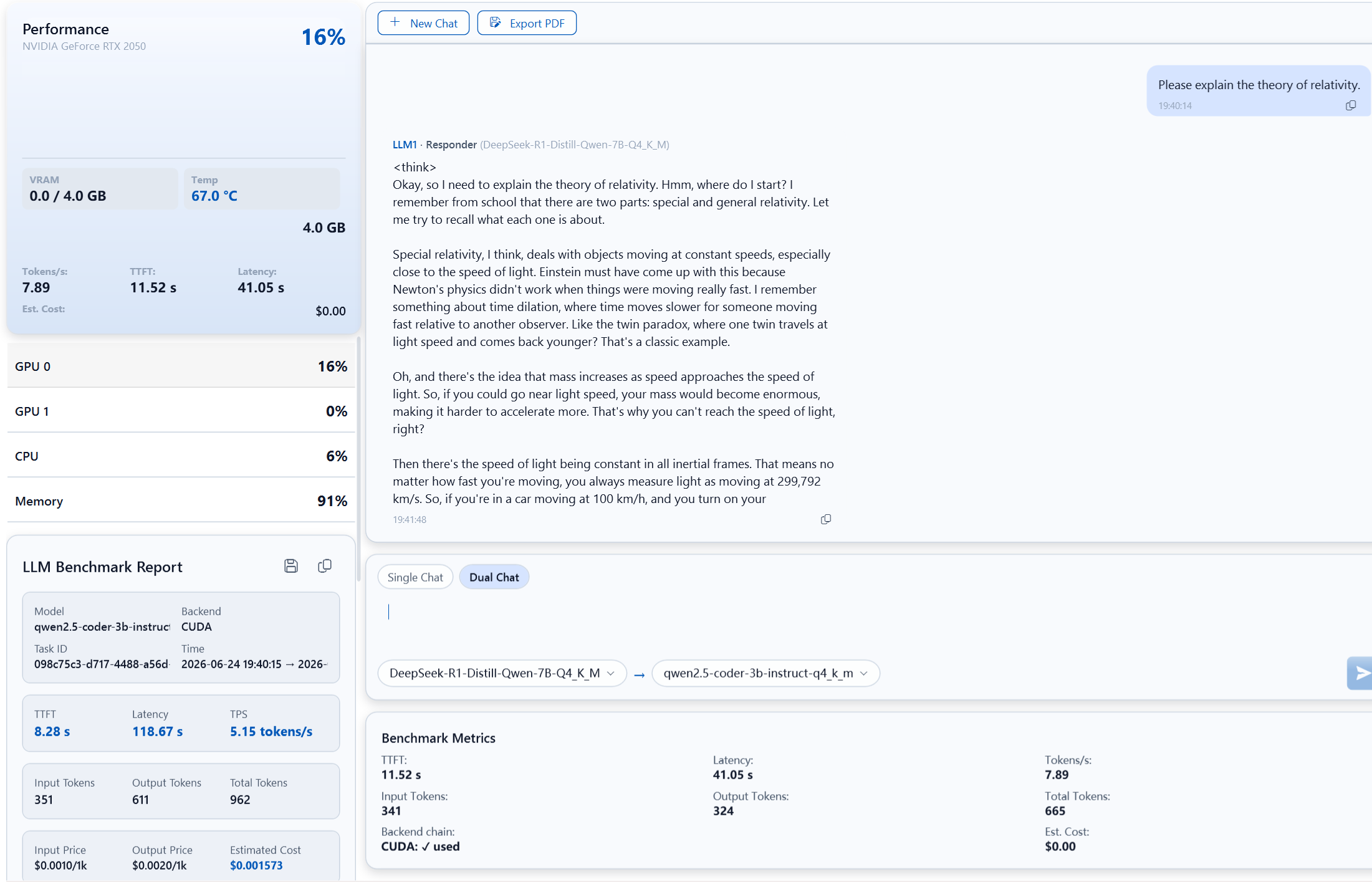
Chat Benchmark — Dual Chat with GPU monitoring and real-time metrics
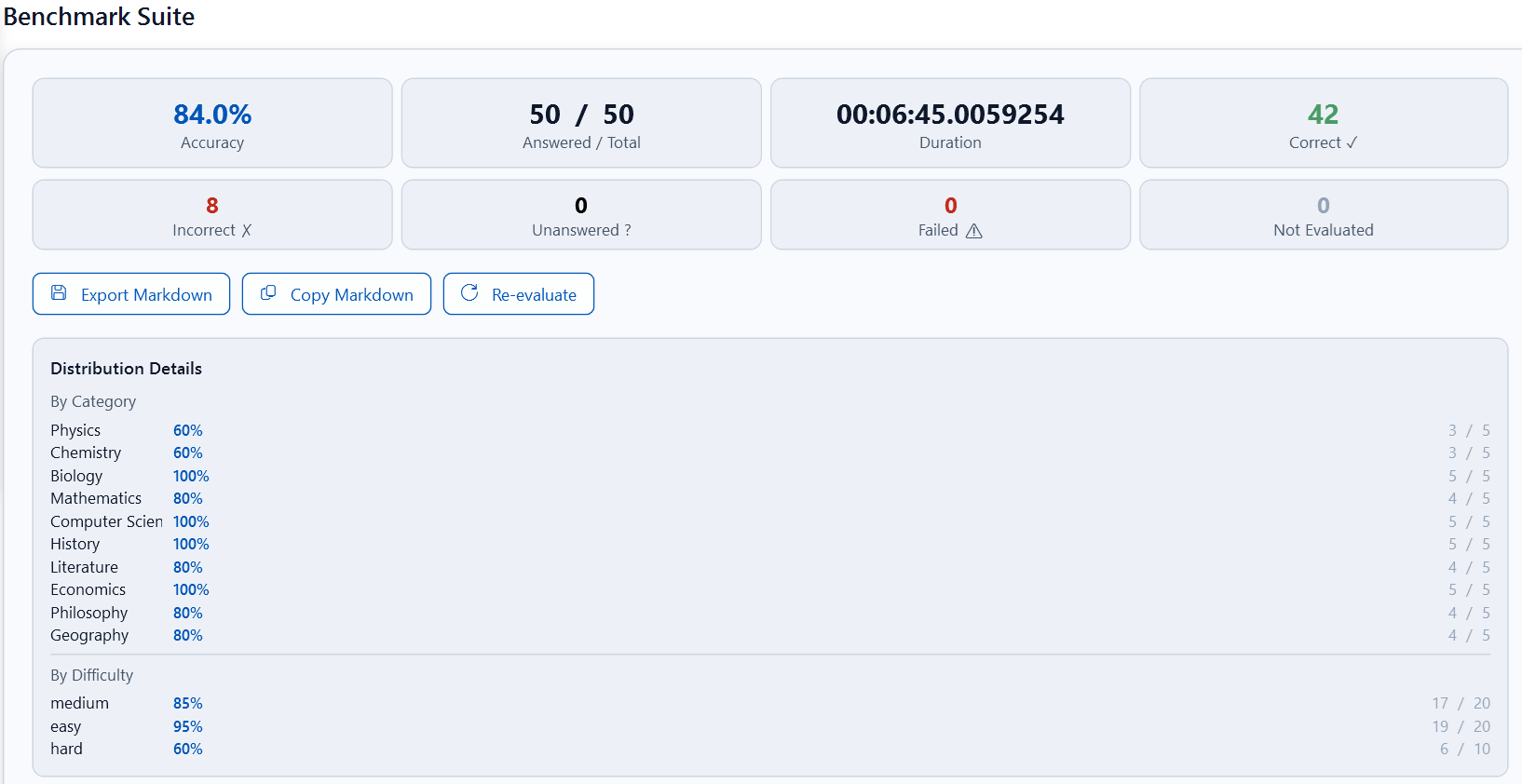
Benchmark Suite Results — Accuracy, category distribution, and difficulty breakdown
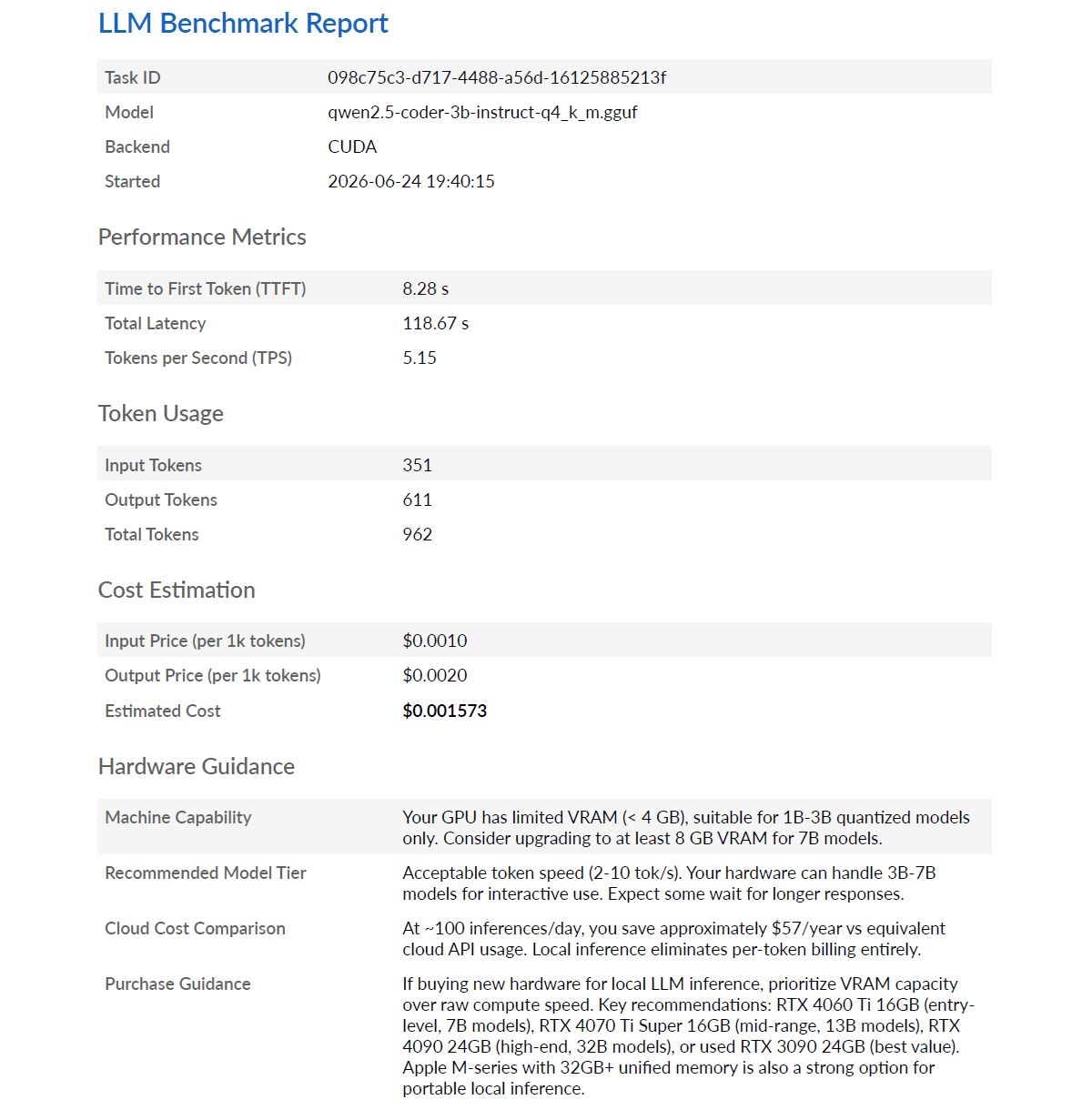
LLM Benchmark Report — Performance metrics, cost estimation, and hardware guidance

Everything You Need — And It's Free

GpuLLM is the most complete free Windows suite for local LLM evaluation. Here's everything you get — no subscriptions, no paywalls.

Local LLM Inference

Run GGUF-format large language models directly on your GPU using LLamaSharp with llama.cpp backend. Supports CUDA, Vulkan, and CPU fallback — automatically selects the best available backend.

Import Local GGUF Models

Beyond the curated catalog, import any GGUF-format model from your local disk. Point GpuLLM to your own GGUF files and start chatting with custom or community models instantly — no cloud upload required.

Real-Time GPU Monitoring

Track GPU utilization, VRAM usage, temperature, and power draw in real time. Includes 60-second sparkline history charts and multi-GPU support with automatic device discovery.

Chat Benchmark & Cost Savings

Chat with any model and instantly measure your GPU's token generation speed (tokens/s), Time-to-First-Token, and total latency. The built-in cost estimator compares your local inference against cloud API pricing — showing exactly how much money you save by running models locally.

Model Library & Manager

Browse 13 curated models including Qwen2.5-Coder, DeepSeek-R1, Llama 3.2, Gemma 3, and Mistral. Filter by category — Coding, Chat, or Reasoning — and check VRAM compatibility with one click.

HuggingFace Download

Download models directly from HuggingFace Hub or ModelScope. Supports resumable downloads with SHA-256 verification, multi-source fallback, and license consent management.

Dual-Model Conversation: Responder & Reviewer

Pioneer a new interaction pattern — assign two LLM roles in a single chat: a Responder that answers your questions, and a Reviewer that critically evaluates and improves the answer. This LLM-as-a-Judge / Agentic Debate pattern, widely discussed in AI research, lets you harness the strengths of two different models simultaneously for higher-quality, self-correcting conversations.

GPU Spirit Animation

Prism Cat — a live animated mascot that responds to your GPU utilization levels. Watch the cat's emotional state and color shift in real time as inference workloads ramp up.

Model Capability Evaluation

Benchmark your models against comprehensive question sets: 100 English questions (MMLU, sampled from 57 subjects) and 100 Chinese questions (C-Eval), covering 10+ dimensions including Mathematics, Physics, Chemistry, Biology, Computer Science, History, Literature, Economics, Philosophy, and Geography. Get per-category accuracy, difficulty-level breakdown, and exportable Markdown reports.

Inference Details Report

Each inference produces a detailed report with backend chain, GPU peak metrics, and token-level statistics. Export full chat conversations and reports as A4 PDF documents.

What Makes GpuLLM Different

GpuLLM

  • Chat + benchmark in one interface
  • Dual-model conversation (Answerer + Reviewer)
  • MMLU & C-Eval accuracy evaluation
  • Real-time GPU monitoring with sparkline charts
  • Cloud API cost savings estimator
  • 13-model curated catalog, one-click download
  • 100% offline, no telemetry
  • Completely free — no subscriptions

Other Tools

Most alternatives let you chat with models but don't measure performance, evaluate accuracy, or track GPU metrics. You're left guessing which model works best on your hardware — and whether you're actually saving money versus cloud APIs.

13 Pre-Configured Models, 3 Categories

Every entry includes the correct HuggingFace repo, quantization, and file size — download with one click.

Display NameCreatorCategorySizeVRAM
Qwen2.5-Coder 3BAlibabaCoding1.9 GB8 GB
Qwen2.5-Coder 7BAlibabaCoding4.2 GB16 GB
DeepSeek-Coder V2 LiteDeepSeekCoding9.0 GB24 GB
Llama 3.2 1B InstructMetaChat0.7 GB4 GB
Llama 3.2 3B InstructMetaChat2.0 GB8 GB
Gemma 3 4B InstructGoogleChat2.5 GB8 GB
Mistral 7B InstructMistral AIChat4.1 GB16 GB
Qwen2.5 7B InstructAlibabaChat4.7 GB8 GB
Qwen2.5 14B InstructAlibabaChat8.9 GB24 GB
DeepSeek-R1-Distill 1.5BDeepSeekReasoning1.0 GB4 GB
DeepSeek-R1-Distill 7BDeepSeekReasoning4.2 GB16 GB
DeepSeek-R1-Distill 14BDeepSeekReasoning8.5 GB16 GB
DeepSeek-R1-Distill 32BDeepSeekReasoning20 GB32 GB

100% Offline. 100% Free. No Strings Attached.

LLamaSharp / llama.cpp

High-performance C++ inference engine with managed .NET bindings — the same backend that powers countless local AI applications worldwide.

WPF-UI (Fluent Design)

Modern Windows desktop UI with Fluent Design System components. Dark/light theme support with glass effect materials and smooth animations.

Multi-Backend Fallback

CUDA 12 → Vulkan → CPU automatic fallback chain. The app detects available hardware and selects the fastest backend without manual configuration.

Privacy by Design

All model inference, data processing, and file operations happen exclusively on your local device. No telemetry, no cloud dependency, no network required once models are downloaded.

Understanding Local LLM Benchmarking

What Is tokens/s?

Tokens per second measures how fast a language model generates text. Higher tokens/s means more responsive conversations. GpuLLM measures both peak and sustained throughput to give you a complete picture of your GPU's LLM performance.

What Is TTFT?

Time To First Token (TTFT) measures the latency between sending a prompt and receiving the first word of the response. Lower TTFT means snappier interactions. GpuLLM tracks TTFT to help you compare model responsiveness.

What Is MMLU?

Massive Multitask Language Understanding (MMLU) is a standard benchmark testing knowledge across 57 subjects. GpuLLM includes 100 sampled questions to evaluate your model's breadth of knowledge and reasoning ability.

What Is C-Eval?

C-Eval is a Chinese evaluation suite covering 52 disciplines and four difficulty levels. GpuLLM includes 100 questions to test your model's Chinese language understanding and domain knowledge.

Frequently Asked Questions

Is GpuLLM really free?
Yes. GpuLLM is completely free with no subscriptions, no paywalls, and no hidden costs. Every feature — chat, benchmark, GPU monitoring, and model evaluation — is included at no charge.
Does GpuLLM work offline?
Yes. All inference runs 100% on your local machine. The only thing that ever touches the internet is downloading models from HuggingFace or ModelScope. Once downloaded, no internet connection is needed.
What models can I run with GpuLLM?
GpuLLM supports all GGUF-format models. It comes with a curated catalog of 13 models including Qwen2.5-Coder, DeepSeek-R1, Llama 3.2, Gemma 3, and Mistral. You can also import any GGUF file from your local disk.
How is GpuLLM different from other LLM tools?
Most alternatives let you chat with models but don't measure performance, evaluate accuracy, or track GPU metrics. GpuLLM is the only free Windows app that combines chat, benchmark, GPU monitoring, model evaluation (MMLU/C-Eval), and cost estimation in one package.
How do I get started with GpuLLM?
Download GpuLLM from the Microsoft Store, browse the Model Library to choose a model that fits your GPU's VRAM, click Download, then Load, and start chatting in Chat Benchmark. Full guide available in the Help section.

GpuLLM is a Windows desktop application. All inference, benchmark, and evaluation runs locally on your device. No model data or chat content is ever uploaded to any server. The download link opens Microsoft Store in your default browser.

All tools on fastool.io run entirely in your browser — zero data leaves your device. No personal data is collected, stored, or transmitted to any server. Solar calculations use SunCalc.js; lunar data uses JPL DE440 ephemeris; coordinate transforms use publicly documented EPSG/OGC standards. This site requires no signup, no account, and no cloud processing.